VisualSVN Server 6.0 Release Notes
This version brings an upgrade to Apache Subversion 1.15 and many other enhancements.
Highlights of this release
Upgrade to Apache Subversion 1.15
Apache Subversion 1.15 is the latest milestone Subversion release, which introduces the following new features and improvements:
-
Pristines on Demand
Pristines on Demand is a new feature that can reduce the size of Subversion's working copies by up to 50%. Prior to Subversion 1.15, a working copy was always more than double the size of the checked-out files, because its hidden .svn directory always cached additional pristine (i.e. unmodified) copies of all the checked-out files. For example, such pristine copies are used for operations like svn revert and svn diff, and also allow efficient delta-based commits. When Pristines on Demand is enabled, Subversion clients will instead fetch and store pristine copies only when they are first needed and only for files that have local uncommitted changes. This can greatly reduce client-side storage usage, at the potential cost of using extra communication with the repository for certain operations. Users can enable this new feature per working copy at checkout time. -
Streamy checkouts
This new feature results in faster checkout and update operations. It also eliminates certain network connection timeouts that could cause the server to drop the connection during a checkout or update of a large directory. -
Multiple working copy format support
Support for multiple working copy formats makes Subversion 1.15 clients compatible with existing Subversion 1.8-1.14 working copies. Users do not have to upgrade existing working copies before using them with a 1.15 client.
View the full Apache Subversion 1.15 Release Notes
Server Status job
VisualSVN Server 6.0 introduces a new type of scheduled job: a Server Status job for automated server health reporting. The new Server Status job periodically checks the server and warns the administrator about problems that may cause service disruptions.
The job can check the status of the product license installed on the server instance and the validity of the server's TLS/SSL and VDFS replication certificates. It can also detect when free disk space is running out for repository storage, full-text search indexes or repository backups.

Learn more about Server Status jobs
Managing versioned properties
Administrators can now manage versioned properties directly in VisualSVN Server Manager. This feature provides a convenient way to view, add, remove and edit versioned properties on any path in a repository, with inherited properties being displayed as well.
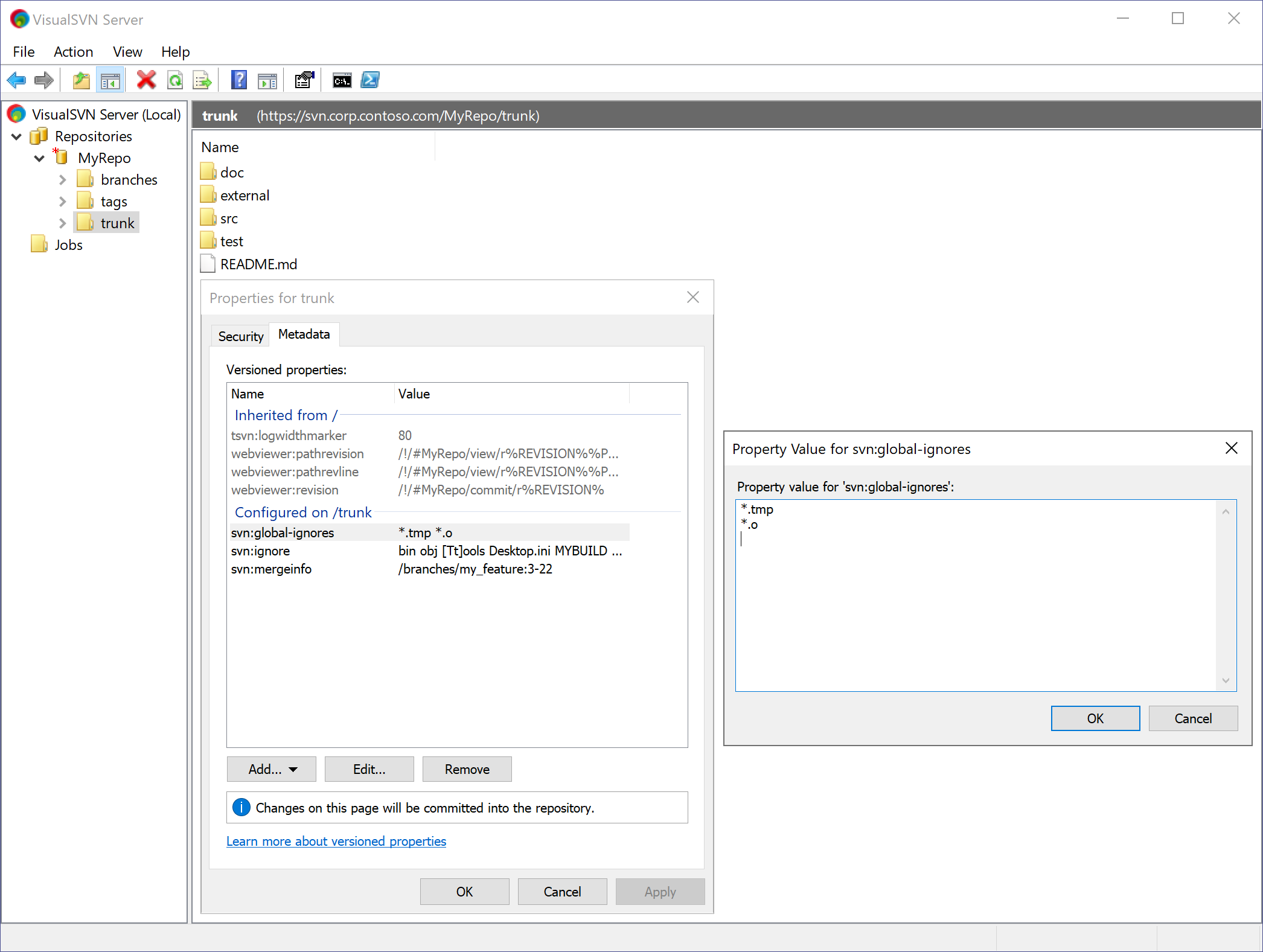
Additionally, there is a new command to automatically configure webviewer properties, which integrate Subversion clients with the Repository Web Interface. The new command provides a quick way to set these properties and helps avoid typos, which are possible when configuring these properties manually.
Learn more about managing versioned properties
More enhancements
Other most notable enhancements introduced in VisualSVN Server 6.0 are the following:
- Word-level difference highlighting. The Repository Web Interface now highlights not just the lines that have been modified by a commit, but also what exactly has changed within these lines. This makes reviewing commits in the web interface more convenient and makes it easier to notice even small changes at a glance.
- IP-based exceptions for Password Guessing Attack Protection. Configuring such exceptions allows selectively turning off this protection for a limited scope of IP addresses, to support complex scenarios and maximize compatibility.
-
A new --filter-glob option in VisualSVNServerHooks.exe. To
configure a repository hook to selectively run only when the triggering
event affects certain repository paths, it is now possible to set filters
as glob patterns with wildcards (e.g.
--filter-glob
      /*/trunk
). - Enhanced logging for the Subversion authentication mode. Logging has been improved to also record changes made to repository access permissions, users and groups. Besides that, self-service password changes made through the web interface are now also logged.
-
Normalizing Subversion properties when importing a repository.
When importing a repository from a dump file, there is now an option to
normalize properties. This feature can be used to automatically repair
invalid end-of-line characters in all Subversion's properties (e.g. in
svn:logandsvn:ignorevalues).
Upgrading to the new version
The upgrade to VisualSVN Server 6.0 is recommended for all users. Please read the KB251: Upgrading to VisualSVN Server 6.0 article before beginning the upgrade.
The upgrade is free for all customers who have an active maintenance subscription for Enterprise or Essential licenses. The upgrade is also free for all customers who use VisualSVN Server under the Community license.
Compatibility considerations
Compatibility changes in VisualSVN Server 6.0 include the following:
- Dropped support for Windows Server 2012 R2. The minimum supported operating systems are now Windows Server 2016 and Windows 10 (version 1607 or later).
- Dropped support for 32-bit versions of Windows. The VisualSVN Server installation package is now x64 only.
- The standalone installation package of VisualSVN Repository Configurator is now x64 only.
VisualSVN Server 6.0 is built with Apache Subversion 1.15 and is fully backward compatible with older Subversion clients. The most substantial new features introduced in Apache Subversion 1.15 such as pristines on demand and streamy checkouts are implemented as client-side improvements that do not affect Subversion clients' compatibility with VisualSVN Server.
Please see the table below for details on compatibility between VisualSVN Server 6.0 and each of the client versions.
| Client version | Compatibility | Notes |
|---|---|---|
| Subversion 1.15 | Full | Subversion 1.15 clients are up-to-date and have no compatibility issues. |
| Subversion 1.14 | Full | Subversion 1.14 clients have no compatibility issues. |
| Subversion 1.13 | Full | Subversion 1.13 clients have no compatibility issues. |
| Subversion 1.12 | Full | Subversion 1.12 clients have no compatibility issues. |
| Subversion 1.11 | Full | Subversion 1.11 clients have no compatibility issues. |
| Subversion 1.10 | Full | Subversion 1.10 clients have no compatibility issues. |
| Subversion 1.9 | Full (with caveats) |
Subversion 1.9 clients do not support the following capabilities:
|
| Subversion 1.8 | Full (with caveats) |
Subversion 1.8 clients do not support the following capabilities:
|
| Subversion 1.7 | Full (with caveats) |
Subversion 1.7 clients do not support the following capabilities:
|
| Subversion 1.6 | Full (with caveats) |
Subversion 1.6 clients do not support the following capabilities:
|
| Subversion 1.5 | Full (with caveats) |
Subversion 1.5 clients do not support the following capabilities:
|
| Subversion 1.4 | Limited |
Subversion 1.4 clients do not support the following capabilities:
|
| Subversion 1.3 | Limited |
Subversion 1.3 clients do not support the following capabilities:
|
| Subversion 1.2 | Limited |
Subversion 1.2 clients do not support the following capabilities:
|
| Subversion 1.1 | Limited |
Subversion 1.1 clients do not support the following capabilities:
|
| Subversion 1.0 | Limited |
Subversion 1.0 clients do not support the following capabilities:
|